
I used to spend at least two hours every night scrolling through traditional social media, constantly refreshing feeds filled with outrage, political arguments, and unrealistic lifestyle comparisons. The myth we all buy into is that we need these massive platforms to stay connected. In reality, their algorithms are intentionally designed to hijack your brain’s threat-detection systems, keeping you engaged through stress.
I hit a breaking point last month. I was tired of the constant negativity and decided to actively search for a digital environment that did not treat my anxiety as a monetization tool. That is when I found Hopenity.

Most people look at alternative social networks and assume they are just empty ghost towns or naive experiments. I thought the exact same thing. I assumed an app built entirely around “positivity and community” would be incredibly boring or functionally broken.
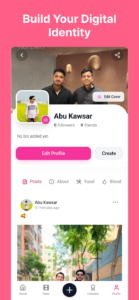
I decided to completely replace my standard social media apps with Hopenity for a full month. I wanted to see if the platform could actually deliver on its promise of a healthier digital community. What I noticed completely changed how I interact with my smartphone. If you want to escape the toxic algorithm loop without completely isolating yourself from the world, I am going to show you exactly how this platform operates behind the screen.
The Sentiment Algorithm: How Hopenity Actually Works
To understand why this app feels so different, you have to look at the backend architecture. Standard platforms like X (formerly Twitter) or Facebook rely on a variable ratio reinforcement schedule. They feed you a mix of things you like and things that make you angry, because anger drives the highest rate of keyboard interaction.
Hopenity operates on a completely inverted metric. Behind the scenes, the app uses a positive sentiment analysis filter. When a user submits a post, the platform’s text-processing script scans the vocabulary for constructive language, community support, or actionable charitable causes.
Instead of pushing controversial hot-takes to the top of your feed, the algorithm prioritizes posts that generate meaningful engagement. A post does not go viral here because people are arguing in the comments. It gains traction because users are utilizing the app’s built-in support tools to share resources, back a cause, or offer genuine advice.
Furthermore, the notification architecture is entirely different. Traditional apps use bright red notification badges because red triggers a neurological urgency response. Hopenity uses muted, calming tones for its UI alerts. It mathematically reduces the frequency of push notifications, bundling them into less intrusive daily summaries. This makes it the best app for positive social networking because it fundamentally respects your psychological boundaries.
The Definitive Guide to Setting Up a Healthier Feed
Knowing how to use Hopenity properly requires you to stop treating it like Instagram. You are not here to broadcast a highly edited version of your life; you are here to curate a feed that actually benefits your mental space. Here is my exact methodology for configuring the app for maximum value.
Disabling the “Always-On” Notification Engine
When you first install the app, it still asks for standard push notification permissions. If you leave these on default, you will still feel tethered to your phone. You need to restrict the app’s ability to interrupt your day.
Open the application and tap your profile avatar in the bottom right corner. From there, hit the gear icon to open your Account Settings, and navigate directly to the Push Preferences tab.
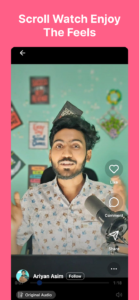
Do not just toggle everything off. Instead, look for the Batched Notifications setting. Change this from “Instant” to “Once Daily.” This forces the server to hold all your non-critical alerts—like post likes or general community updates—and deliver them at a specific time you choose, like 6:00 PM. You take back complete control of your attention span.
Hopenity Tips and Tricks for Cause Filtering
The most powerful feature in this app is the Cause Filter, but it is buried under two layers of menus. By default, the app shows you a global feed of various charitable acts, community support threads, and positive news. This can still feel overwhelming.
To fix this, go to your main timeline and swipe left to access the Curated Topics menu. Here, you can uncheck broad categories and strictly follow hyper-specific tags. For example, I disabled “Global News” and only checked “Local Volunteering” and “Mental Health Support.”
By doing this, you instruct the internal algorithm to aggressively filter out generic content. Your feed instantly transforms from a chaotic bulletin board into a highly relevant, deeply personal support system.
Fixing Background Battery Drain
Because the app is heavily image and video-based, it caches a massive amount of temporary data on your local storage. I noticed that after a week of heavy use, the app was consuming significantly more background battery than it should have.
You can solve this by going into your phone’s native app settings (not the in-game settings). On Android, go to Settings > Apps > Hopenity > Storage, and tap Clear Cache. I highly recommend doing this once every two weeks. It clears out the stored image thumbnails, forcing the app to run lighter and significantly extending your screen-on time.
Honest Pros and Cons
I never recommend a piece of software without being brutally honest about its flaws. While I love the mission behind this platform, you need to know exactly what you are getting into.
The Real Advantages:
The community is genuinely supportive. I tested this by posting a question about dealing with career burnout, and the responses I received were thoughtful, paragraphs-long, and completely troll-free.
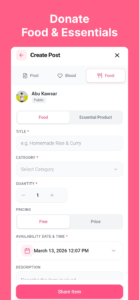
The integration with verified charities and social causes is seamless. You can actually track the impact of community movements directly within the UI.
The lack of infinite doom-scrolling is a massive relief. The app gently lets you know when you are caught up on your core interests.
The Real Disadvantages:
The user base is significantly smaller than major tech giants. If you live in a rural area, you might not find many “Local” community events populating on your map.
The video player is noticeably unoptimized. When loading high-definition video uploads, the app sometimes stutters or takes a few extra seconds to buffer, which feels clunky.
Because the algorithm actively suppresses extreme language, some users feel the platform leans too heavily into “toxic positivity,” occasionally making it difficult to have raw, frustrating vents without feeling out of place.
Expert Verdict: Is It Worth the Switch?
If your goal is to build a massive following, become an influencer, or stay on the bleeding edge of viral internet drama, you should completely avoid this app. You will find it slow, quiet, and completely uninteresting.
However, if you are experiencing severe social media fatigue, this application is an absolute necessity. It serves as a perfect “digital detox” tool. You can stay connected to humanity, read uplifting stories, and interact with real people without sacrificing your mental health to an engagement algorithm.
I strongly recommend it for activists, volunteers, and anyone who feels drained by their current screen time habits. It is not going to replace your group chats, but it will absolutely replace the hour you spend mindlessly scrolling through negative news before bed.
I am curious to know how your digital detox journey is going. Drop a comment below and let me know which toxic app you are trying to spend less time on. Also, if you want to further lock down your digital privacy, make sure to read our latest guide on the hidden tracking settings you need to disable on your smartphone right now!
Leave a Reply